 NEXAURA STORES

 Sell on Nexaura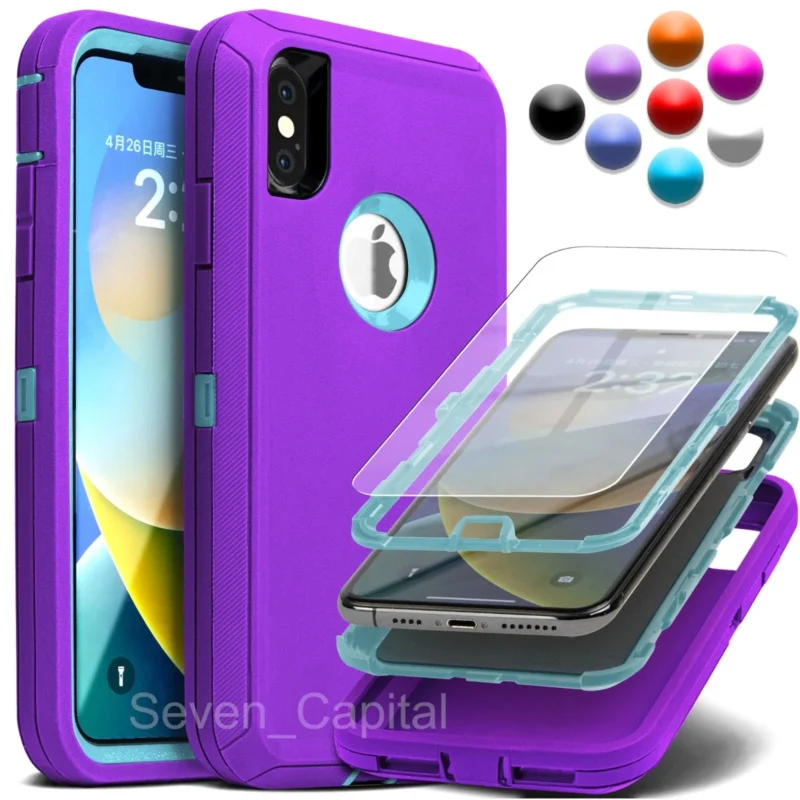
NEXAURA BUYING GUIDE
5 Signs Your Phone Case Needs Replacing
A stretched, yellowed or cracked phone case is no longer protecting your phone — it is just decorating it. Here are the five warning signs that your case has retired, and exactly what to look for in its replacement.
Most of us buy a phone case once, snap it on, and forget about it until something dramatic happens. But a case is a consumable: the same soft TPU and hard polycarbonate that absorbs drops degrades with every bump, every stretch and every hour of sunlight. A case that protected your phone brilliantly in its first year may be doing very little by its third.
The dangerous part is that a worn case still looks like protection. It feels reassuring in the hand and still covers the back of your phone — while quietly failing at the one job it was bought for. Screen repairs cost £100 and up; a replacement case costs less than a takeaway. Here is how to tell which side of that equation you are on.

Sign 1: the corners are cracked, split or crushed
The corners are where drop protection lives. Drop tests consistently show phones land on a corner first, which is why decent cases reinforce all four of them — thickened TPU bumpers, air pockets or hardened inserts that deform on impact to soak up energy instead of passing it to your phone.
That deformation is a one-time deal. Once a corner has crushed, split or cracked, the air pocket is gone and the bumper is just dead material. Run your thumb over each corner: if you can feel a split in the TPU, see a crack in the hard shell, or spot a corner that is visibly flattened compared to the other three, that case has taken its last meaningful hit. It will not absorb the next one.
Corner damage does not even need a dramatic story. Months of being set down on desks, nudged across tables and knocked off sofas compress the same corners slowly. Inspect them in good light every few months — catching a split early is a £9 fix, not a £150 screen replacement.
Sign 2: it no longer fits snugly
A case should grip the phone like a good pair of shoes — snug all round, no wobble, no rattle when you shake it. Soft TPU cases gradually stretch: on goes on, off comes off, and after a year or two of removals (for cleaning, for SIM swaps, for showing a friend) the material loses its tension and the case sits loose.
The shake test takes five seconds. With the phone inside, shake the case gently near your face: any rattling, any gap between the case edge and the phone frame, or a phone that shifts when you twist the case means the fit is gone. A loose case is worse than it sounds — on impact it can shift mid-fall, leaving the edge it was supposed to cover exposed at exactly the wrong moment, and it can even scratch the phone by trapping grit that moves against the frame.
Pay special attention to the lips around the screen and camera cutouts. Those raised edges are the crumple zones; when the TPU around them goes soft, they flatten, and your phone starts lying directly on whatever surface you set it down on.

Sign 3: the material has yellowed, gone brittle or feels tacky
Clear cases are the worst offenders here, but every case ages. UV light from sunlight breaks down the polymers in TPU and polycarbonate — that familiar yellowing is not cosmetic. It is the visible symptom of a material losing its elasticity and impact absorption. A yellowed case is a harder, more brittle case, and brittle plastic transmits shock instead of absorbing it.
Heat accelerates the process. Phones left on car dashboards in summer, cases worn close to radiators, or phones that run hot during long gaming sessions all bake their cases. Squeeze the TPU bumper: fresh TPU springs back instantly and feels slightly soft. Aged TPU feels either hard and plasticky — approaching brittle — or oddly tacky and rubbery, collecting fluff and dust from every pocket.
Either texture change means the chemistry has moved on. The shock absorption the case was certified or marketed with assumed new material. If yours has visibly yellowed or feels different from day one, assume the protection has degraded along with the look.
Sign 4: the buttons are stiff and the cutouts no longer line up
Case buttons are thin membranes of TPU pressed over your phone’s real buttons. With use they fatigue — the click goes mushy, a volume button needs two presses, or the power button sticks. Stiff buttons are a quality-of-life complaint, but they are also a diagnostic: if the button membranes have fatigued, the rest of the case has lived the same life.
Worse are misaligned cutouts. When a stretched case shifts, the charging port hole no longer centres over the port, forcing cables in at an angle — which can wear your charging port over time — and the camera cutout creeps over the lens edge, softening your photos with a hazy vignette you might blame on a dirty lens. Check your case alignment against the phone’s actual ports and lenses: everything should sit dead-centre.
This sign often appears after a big stretch event: forcing the case off to clean it, or yanking a tight case onto the phone. If it went back on looser than it came off, it will only get worse from there.
Sign 5: it survived a serious drop — which means its job is done
Here is the one people miss. A case that saves your phone from a nasty drop onto concrete has done exactly what it was engineered to do — and in doing so, it has likely spent its protective capacity. Shock-absorbing structures work by deforming: air cushions collapse, TPU compresses, hard shells flex. Much of that deformation is invisible from the outside.
After any serious impact — the kind that makes you hold your breath before picking the phone up — give the case a full inspection. Flex each corner gently and look for stress marks, the pale stretch-lines in plastic that signal material fatigue. Check that the bumper still springs back when pressed, not staying dented. And be honest about what “serious” means: a waist-height fall onto tile or concrete counts, even if the phone survived unscathed.
Think of it like a crash helmet. Nobody reuses a helmet after a real crash just because it looks fine. Your phone case is a smaller, cheaper version of the same principle — and unlike a helmet, replacing it costs less than lunch.

OUR PICK
Shockproof Rugged Protective Case for iPhone X / XR / XS Max — $8.98

Everything this guide asks for in one case: a hybrid hard-PC-plus-soft-TPU build that genuinely absorbs shocks, reinforced corners for the drop zones that matter most, raised edges to keep your screen and camera off flat surfaces, and a precise model-specific fit. All at $8.98 — less than most people pay for a coffee and a sandwich.
What to look for in the replacement
Once you have decided the old case is retired, buying the replacement is straightforward if you shop by construction, not by colour. Look for a hybrid build — hard polycarbonate shell bonded to a soft TPU inner — because each material covers the other’s weakness: the hard shell spreads impact forces while the soft layer absorbs them. Reinforced corners are non-negotiable, and raised edges around the screen and camera should keep both off any flat surface the phone lies on.
Fit is the other half of protection. Buy the case made for your exact model, not a “universal” near-match. Port cutouts should be centred, button covers should click cleanly, and the phone should seat fully with no rocking. And while you are refreshing your protection, do the screen too: a case guards the frame and back, but only a tempered glass screen protector stands between your display and a face-down fall — our 3-pack adds privacy filtering that blocks side-on snoopers for $7.99.
One more upgrade worth considering while you are at it: a magnetic wallet card holder for the back of your new case. It snaps on with MagSafe, carries your essentials, and at $7.13 it costs less than most wallets you would lose in a taxi.
Frequently asked questions
How long should a phone case last?
Expect one to three years from a good case, depending on material and use. TPU cases age faster than hard polycarbonate, heavy phone users who remove the case often wear the fit out sooner, and sun exposure shortens every material’s life. Inspect yours yearly and after any serious drop.
Can I keep using a cracked case?
A hairline crack in a cosmetic area is not an emergency, but a cracked or split corner is a genuine failure — that corner will not absorb the next impact. Cases are cheap and screens are expensive, so a damaged corner is the clearest possible signal to replace it.
Does yellowing mean my case is ruined?
Yellowing itself is cosmetic, but it is caused by UV breaking down the polymer — the same process that makes the material harder and less shock-absorbent. A visibly yellowed case has lost a meaningful share of its protection, so treat the colour change as the warning it is.
My case survived a big drop — is it still good?
Inspect it thoroughly: flex the corners, look for stress marks and check the fit is still snug. Shock absorption works by deformation, and much of that is invisible. If the drop was serious — waist height onto a hard surface — replacing the case is the safe move even if the phone is fine.
Is it worth buying a cheap replacement case?
Yes, provided the construction is right. Protection comes from hybrid PC + TPU build, reinforced corners and a precise fit — not from a brand name. A well-designed budget rugged case genuinely protects better than a slim fashion case costing several times more.
TIME FOR A FRESH CASE?
Shop Mobile Accessories at Nexaura Stores
Rugged cases, screen protectors and iPhone essentials — secure checkout and UK delivery as standard.